Free · no account · runs locally with Gemma · for Macs with Apple Silicon
With Gemma, Apple Intelligence* or Ollama, Nadir costs nothing. A cloud model is billed to you directly by its provider.
One day. Plenty on your mind.
What's coming up, what suits you and what makes the evening nicer. This is how a day with Nadir could look.
Nadir
09:00Morning
CalendarWednesday
Your day
10:00Project sync
Go through the feedback on the concept
Chat with Eos
You: On Friday I'm presenting the new concept to the client. The slides are half done, and the numbers are still missing.
Eosthinking
Then the numbers first. Once they're settled, you know what belongs on the slides.
You: Turn that into tasks for me.
Eosdetermined
Two drafts are in your Inbox: the numbers on Wednesday, the slides on Thursday. Have a look before they go into your tasks.
View 2 drafts in Inbox
InboxDrafts between you and your companion
Task draftPendingDoneRejected
Pull together the numbers for the client presentation
Destination: Notes · Tasks · Wednesday
Reviewed and acceptedDraft discarded
Task draftPendingDoneRejected
Finish the slides for Friday
Destination: Notes · Tasks · Thursday
Reviewed and acceptedDraft discarded
NotesNotesTasks
Today
Go through the feedback on the concepttoday
Pull together the numbers for the client presentationtoday
Upcoming
Finish the slides for Fridaytomorrow
11:30Decision
Chat with Eos
You: Have a read of this job. Does it suit me? https://jobs.example/product-designer
Job ad · Example
Product Designer
Concept work, workshops and prototyping.Flat hierarchies.Designs are agreed with the head of department and signed off by them.
Eossceptical
Concept work and workshops suit you well. But three weeks ago you told me that in your last job everything needed approval. Read the part about sign-off again. You didn't want to go back to asking permission for every little thing 😉
You: True. What would you ask in the interview?
Eoscurious
Which decisions does the design team make itself? The answer tells you more than ‘flat hierarchies’.
14:00Research
Oracle
Research question: Which three changes would make our enquiry form easier to understand? Research the basics and back them up with sources.
Label fields clearly. Visible labels explain what belongs in each field. [1]
Explain required fields and formats early. Instructions sit where the input happens. [2]
Check input and report errors accessibly. People can correct entries that cause problems. [3]
18:30After work
KitchenCook something
quick (under 30 min)vegetarian
In the mood for…
I've got courgette, chickpeas and lemon. No more than 20 minutes today.
Let's go
Eos is creating your recipe
Preparing your request
Drafting recipes
Checking recipes
Lemony chickpea and courgette pan
20 min · vegetarian · 2 servings
Eos: One pan is enough today. Lemon in, coriander stays out.
19:15Five minutes of Spanish
Learning
Spanish · A2
Ser or estar?
Choose the right form:
Hoy ___ cansado, pero contento.
soy (selected)
estoy (selected)
es (selected)
Correct
Check answers
20:30Evening
Media LibraryFilmsRecommend now
Where should the suggestions come from?
From my listDiscover something new
Recommended by Eos
No recommendations yet. You can search yourself at any time.
Eos is creating recommendations
Reviewing your library
Selecting candidates
Explaining recommendations
Saving recommendations
From your wishlist
Paterson
Eos says:You often rate quiet dramas highly, and this one is still on your wishlist.
Nadir
09:00Morning
CalendarWednesday
Your day
10:00Project sync
Go through the feedback on the concept
Chat with Morpheus
You: On Friday I'm presenting the new concept to the client. The slides are half done, and the numbers are still missing.
Morpheusthinking
The numbers carry the concept. As long as they're missing, you're building the slides on guesses.
You: Turn that into tasks for me.
Morpheusdetermined
I've put two drafts in your Inbox. Wednesday the numbers, Thursday the slides. Check them, then take over what fits.
View 2 drafts in Inbox
InboxDrafts between you and your companion
Task draftPendingDoneRejected
Pull together the numbers for the client presentation
Destination: Notes · Tasks · Wednesday
Reviewed and acceptedDraft discarded
Task draftPendingDoneRejected
Finish the slides for Friday
Destination: Notes · Tasks · Thursday
Reviewed and acceptedDraft discarded
NotesNotesTasks
Today
Go through the feedback on the concepttoday
Pull together the numbers for the client presentationtoday
Upcoming
Finish the slides for Fridaytomorrow
11:30Decision
Chat with Morpheus
You: Have a read of this job. Does it suit me? https://jobs.example/product-designer
Job ad · Example
Product Designer
Concept work, workshops and prototyping.Flat hierarchies.Designs are agreed with the head of department and signed off by them.
Morpheussceptical
Much of it fits what you do. I'd look more closely at the sign-off. Three weeks ago you told me that in your last job everything needed approval. How much would you get to decide yourself here?
You: True. What would you ask in the interview?
Morpheusthinking
Which decisions can I make without sign-off? A concrete answer would tell you more than ‘flat hierarchies’.
14:00Research
Oracle
Research question: Which three changes would make our enquiry form easier to understand? Research the basics and back them up with sources.
Label fields clearly. Visible labels explain what belongs in each field. [1]
Explain required fields and formats early. Instructions sit where the input happens. [2]
Check input and report errors accessibly. People can correct entries that cause problems. [3]
18:30After work
KitchenCook something
quick (under 30 min)vegetarian
In the mood for…
I've got courgette, chickpeas and lemon. No more than 20 minutes today.
Let's go
Morpheus is creating your recipe
Preparing your request
Drafting recipes
Checking recipes
Lemony chickpea and courgette pan
20 min · vegetarian · 2 servings
Morpheus: Something warm with little effort. With lemon, without coriander.
19:15Five minutes of Spanish
Learning
Spanish · A2
Ser or estar?
Choose the right form:
Hoy ___ cansado, pero contento.
soy (selected)
estoy (selected)
es (selected)
Correct
Check answers
20:30Evening
Media LibraryFilmsRecommend now
Where should the suggestions come from?
From my listDiscover something new
Recommended by Morpheus
No recommendations yet. You can search yourself at any time.
Morpheus is creating recommendations
Reviewing your library
Selecting candidates
Explaining recommendations
Saving recommendations
From your wishlist
Paterson
Morpheus says:Fits your interest in quiet dramas, and it's still on your wishlist.
An example day. Conversations and content are staged, and the steps are shortened. Some features need an internet connection and a suitably set-up AI model.
Takes on the work. You approve it.
Today 3
Run through the Lindgrün slides01:00 PMLindgrün
Present the new inquiry form02:00 PMLindgrün
Send the slides after the meetingtodayLindgrün
Notes
Notes, tasks, checklists
Friday, October 2
A well-filled Friday.
Three events and open tasks, all manageable.
Well filled
16°C
cloudy
Berlin
Calendar
Your day at a glance and appointments
October 2026
Oct 1
Free diary
Finally cracked the Lindgrün form: three steps instead of a wall of fields.
Weekly highlight
The week the form clicked.
Journal
A diary, and your companion sums it up if you ask
Projects · Friday, October 2
Lindgrün Energie: inquiry form
Problem
Fourteen fields on one page. Half the visitors drop out at the address block.
Goal
Fewer drop-offs, fewer support calls.
Documents
Your files and your knowledge, searchable
Oracle reportdone
Conclusion
Fewer fields, clear steps, visible progress. That does the most for inquiry forms.
12 sources147
Oracle*, needs a stronger model
Research with sources and a report
Pad see ew with bok choy
20 minmedium
Summer rolls with prawns
30 mineasy
Kitchen
Recipes and shopping lists
Echo
Record meetings locally, transcribe and summarise them
Tribunal*, needs a stronger model
Several well-founded perspectives on one question
Travel*, needs a stronger model
Plan trips, places, travel documents
Automations
Cooking ideas, a lesson, the day's news: on your schedule
Learning
Topics, practice, weekly plan
Media Library
Films, games, music, books
Arte Factum
Collect links and finds
News
Your feeds, summarised if you like, always with the source
* Needs the built-in model, Ollama or a cloud provider.
How your companion works
You ask.
Your companion prepares.
You review and confirm.
Drafts for tasks, notes, appointments, journal entries and documents land in your Inbox. They go in only once you confirm them.
We're walking the same circle again. Is it protecting you from a decision? Or do you need more time?
That's one possible reading. Not evidence yet. I'd keep two versions and test the one that changes something in your day.
How Nadir works alongside you.
Three conversations: one with pushback, one from memory, one it starts itself.
Says no, too.
Eos and Morpheus have a stance of their own. They tell you what they see, even when you were hoping to hear something else. With a reason, and with a suggestion that holds up. The decision stays yours.
Chat with Eos
You: Read my business plan and tell me it's good. Today I just need a yes.
Eossceptical
I'd love to give you a yes. But page three counts on 40 customers in the first month, and I can't see where they come from.
Eoscurious
The rest holds up. Shall we sort out that one number together before you send it?
You: Okay. But quickly.
Eosjoyful
Quickly I can do. First question: how many people have got in touch so far?
Chat with Morpheus
You: Read my business plan and tell me it's good. Today I just need a yes.
Morpheussceptical
A yes from me would be cheap today. The 40 customers in the first month are just there, and the plan never says where they come from.
Morpheusthinking
The structure is clear and the costs are honest. It all hangs on that one assumption. Let's rebuild it from the bottom up.
You: Okay. But quickly.
Morpheusamused
Quick, and from the bottom up. How many enquiries did you get last month?
Remembers what you told it.
Nadir keeps what you tell it and brings it up when it fits, weeks later too. Ask for a weekly plan and you get one that fits your actual week. You can see every memory with its source and correct or delete it.
Chat with Eos
Two weeks ago
You: My interview at the agency is on Thursday in two weeks. 2 pm, and I already feel queasy.
Today
You: Can you help me plan the week?
Eoscurious
Sure. This Thursday at 2 pm is your interview at the agency. Plan that in first.
Eoscomforting
You said it already makes you queasy. Keep the morning free and have something light for lunch. It settles the stomach.
Chat with Morpheus
Two weeks ago
You: My interview at the agency is on Thursday in two weeks. 2 pm, and I already feel queasy.
Today
You: Can you help me plan the week?
Morpheusthinking
Yes. The fixed point is this Thursday, 2 pm, your interview at the agency. I'd plan the rest around it.
Morpheuscomforting
You wrote that it already makes you queasy. Better to do the preparation on Wednesday and keep Thursday quiet.
Writes first, if you want it to.Pictures need an online service
Switch it on and your companion also writes on its own: a short note about your day. Pictures follow with the next update, only if you allow them as well and three a month at most. No ads, no “where have you been?”.
Chat with Eos
Today, 7:40 am
Eosjoyful
Morning. Your day is packed, the first meeting is at nine.
Eosgreeting
So here's a sunrise from me before the calendar takes over.
Soon
Chat with Morpheus
Today, 9:10 pm
Morpheusconcerned
Today was six meetings in a row. Tomorrow your calendar is empty until eleven.
Morpheusrelieved
The presentation fits the quiet morning better than tonight. Here's the evening from my terrace.
Soon
Gets to know you. And shows you what it knows.
From day one
What you share during setup.
Over time
Projects, people and preferences from your conversations.
Any time
See every memory with its source, correct it or forget it for good.
Every companion has its own memory. What you tell Eos, only Eos knows. Journal, notes and appointments are shared by all.
Your data lives on your Mac.
A companion who knows you. Its memory lives on your Mac.
Only if you wantCloud modelWeb searchImages
Your MacConversationsMemoryNotesDocumentsBackup
Everything stays with you
Nadir stores conversations, memory and settings on your Mac. Notes and documents are plain text files in a folder you choose, readable in any editor.
Your content never reaches us
There is no Nadir account, and the app never sends your content to us. Once a day at most it asks whether there is a new version, with no ID, and you can switch that off.
You choose where your companion thinks
Locally with the built-in model, Apple Intelligence* or Ollama. Or in the cloud through OpenRouter with your own key: then requests go straight to that provider, background tasks included. Web search and images are separate paths you can switch off.
Backup built in
Settings → Data → Backup packs everything into one encrypted archive. Without your passphrase nobody can open it, us included.
In the chat, Eos and Morpheus stand on their own stage, in the style of a visual novel. As the conversation moves, they switch between 42 facial expressions and poses, from thoughtful to relieved.
Screens from Nadir, in the order of the day above. The sample data is made up.
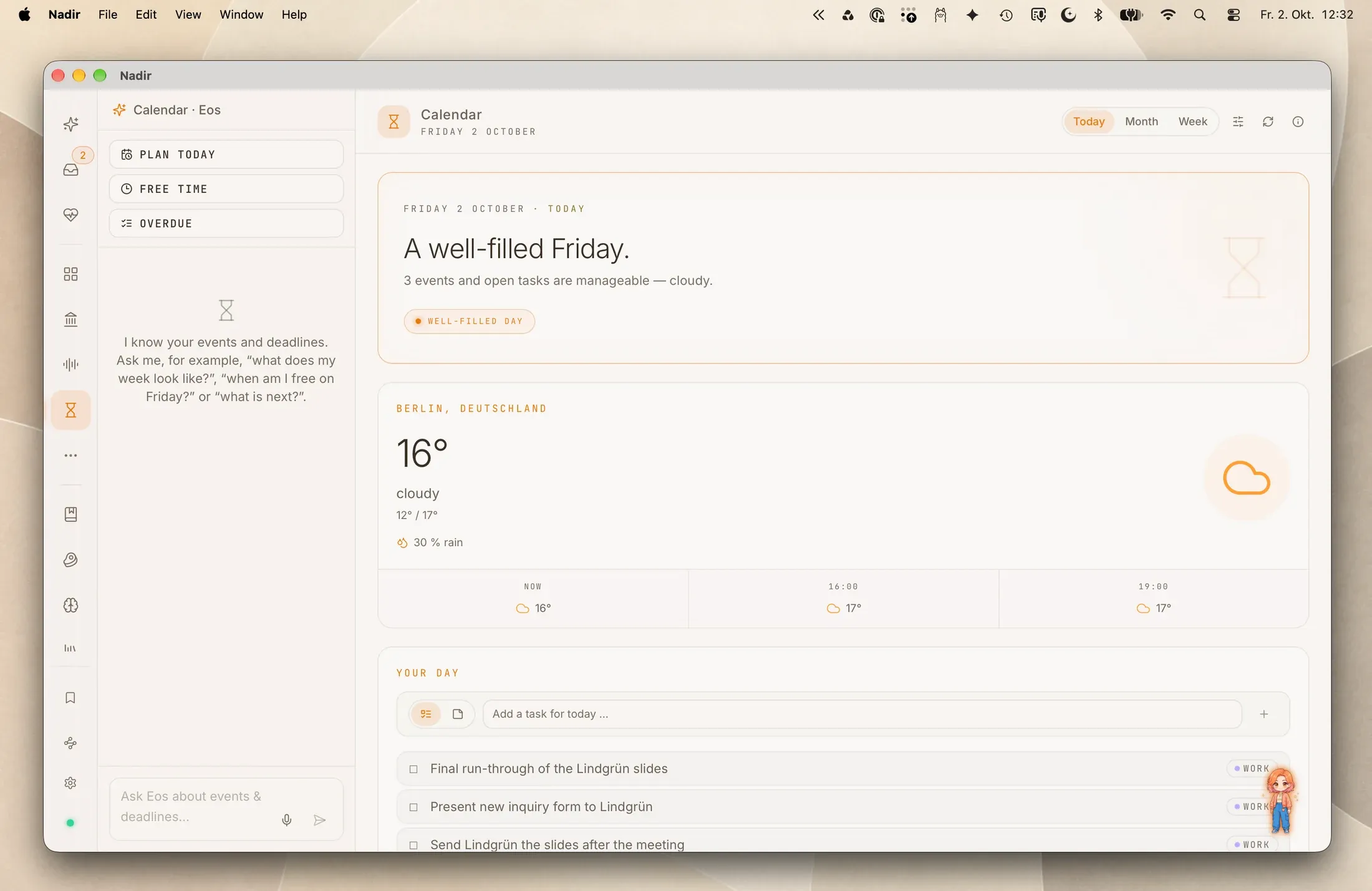
1 of 9 Morning · CalendarThe day starts with an overview: appointments, open tasks and the weather.
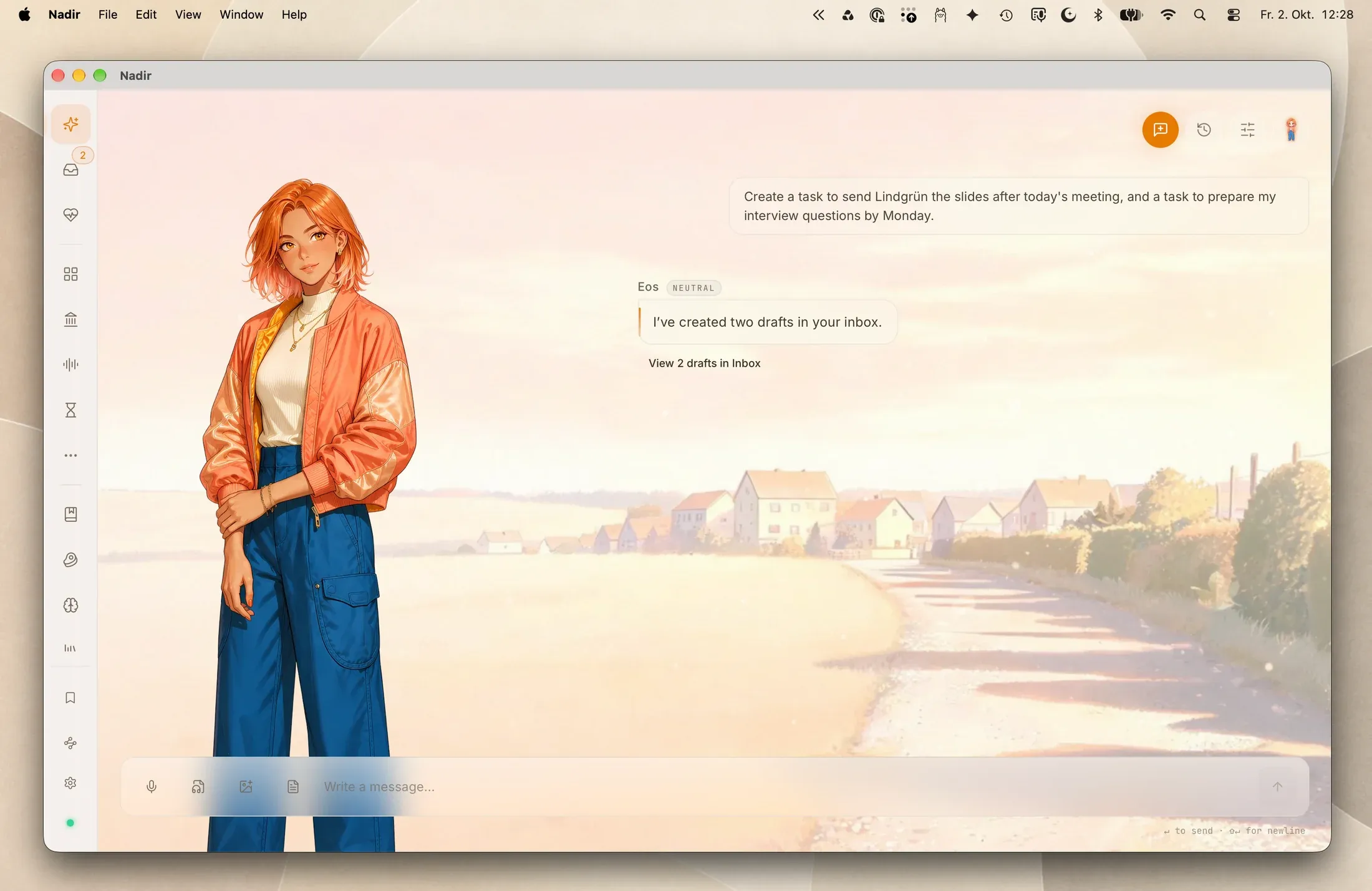
2 of 9 Morning · ChatOne request in the chat: two tasks, one for today, one by Monday. Eos puts them in the Inbox as drafts.
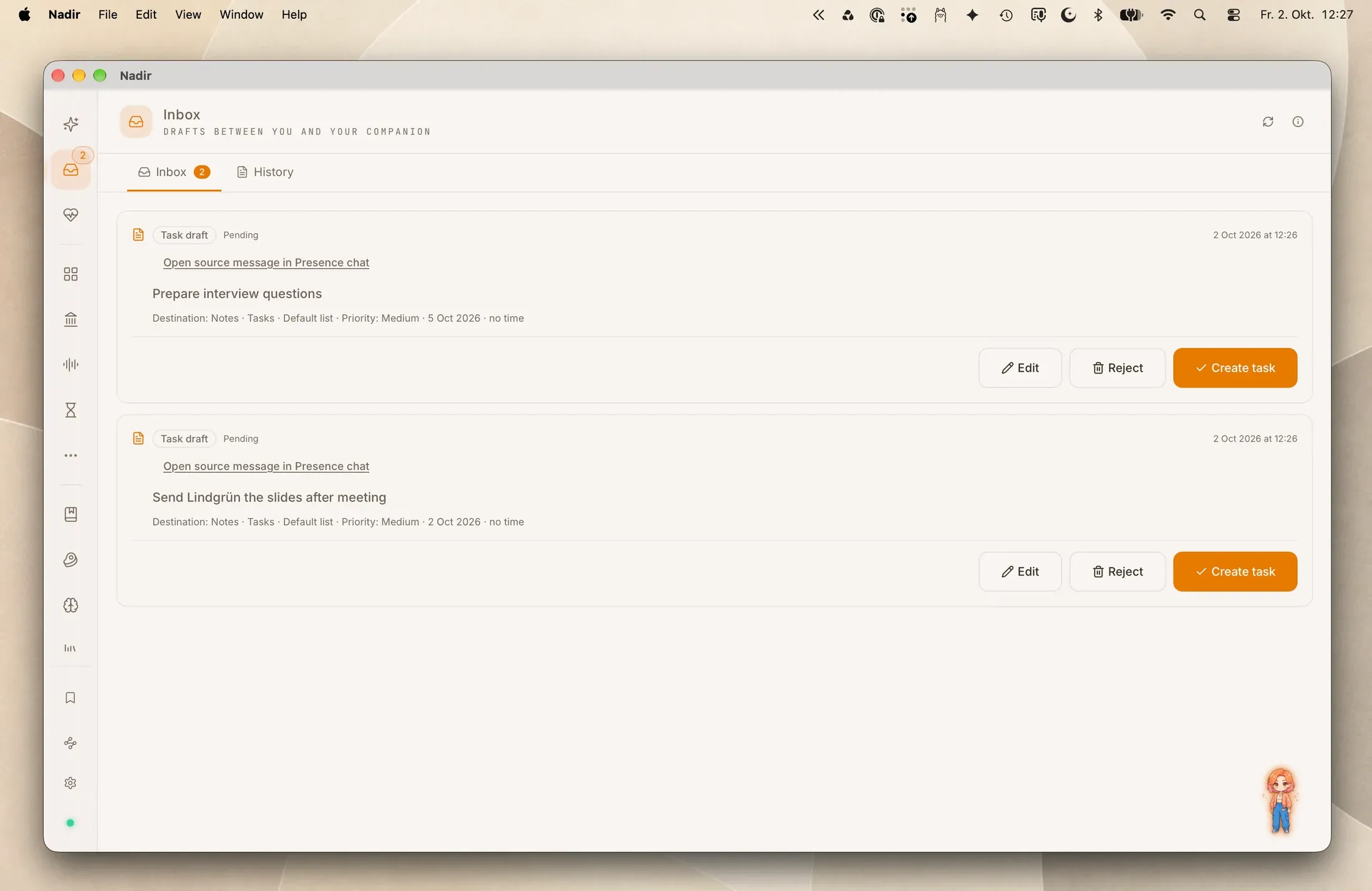
3 of 9 Morning · InboxIn the Inbox you review each draft. Edit it, reject it or create the task.
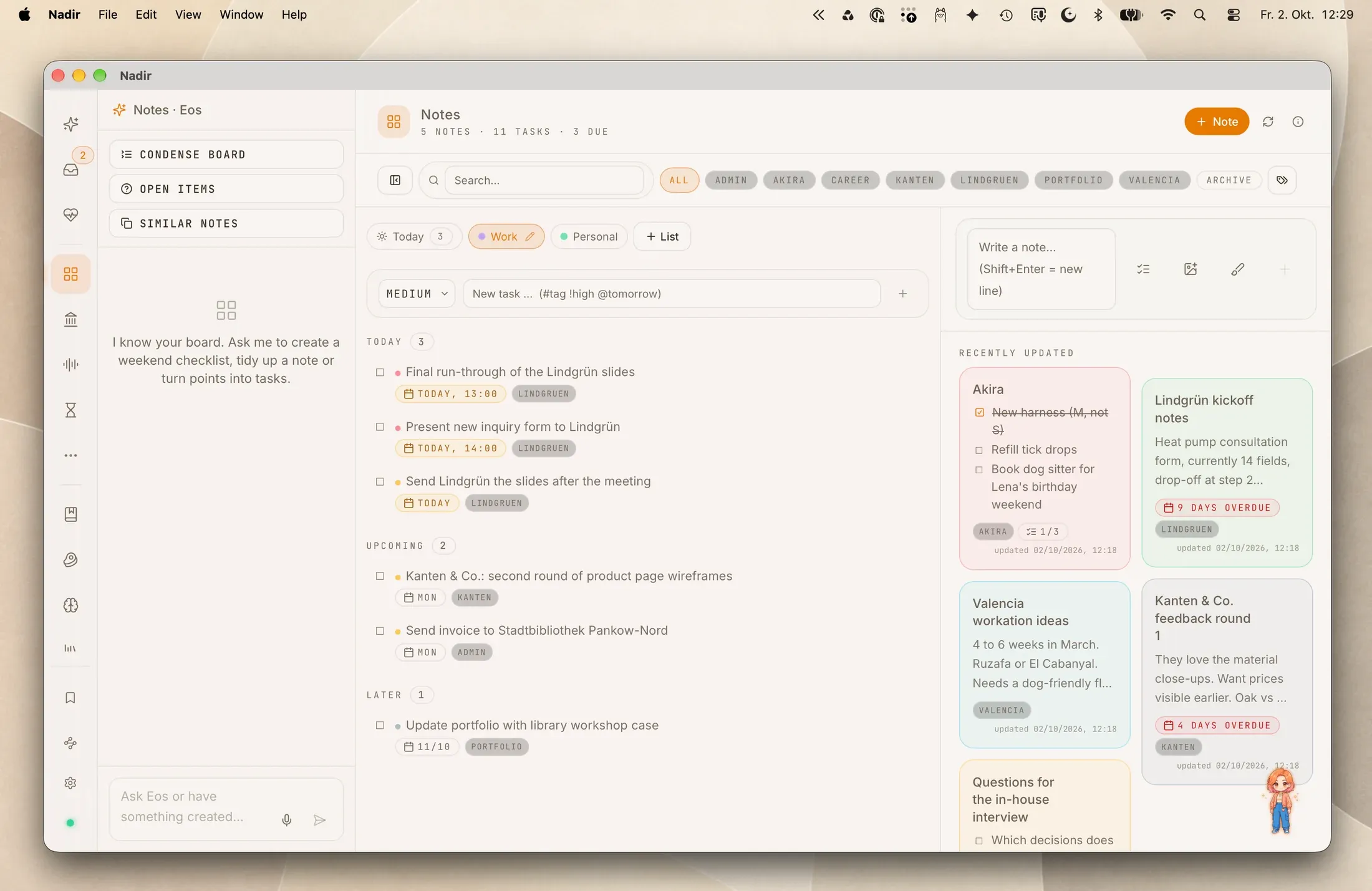
4 of 9 Morning · NotesOnce created, the task sits in Notes, next to projects, checklists and everything due today.
5 of 9 Decision · ChatAt noon, a job offer. Eos reads along and remembers what bothered you at your last job.
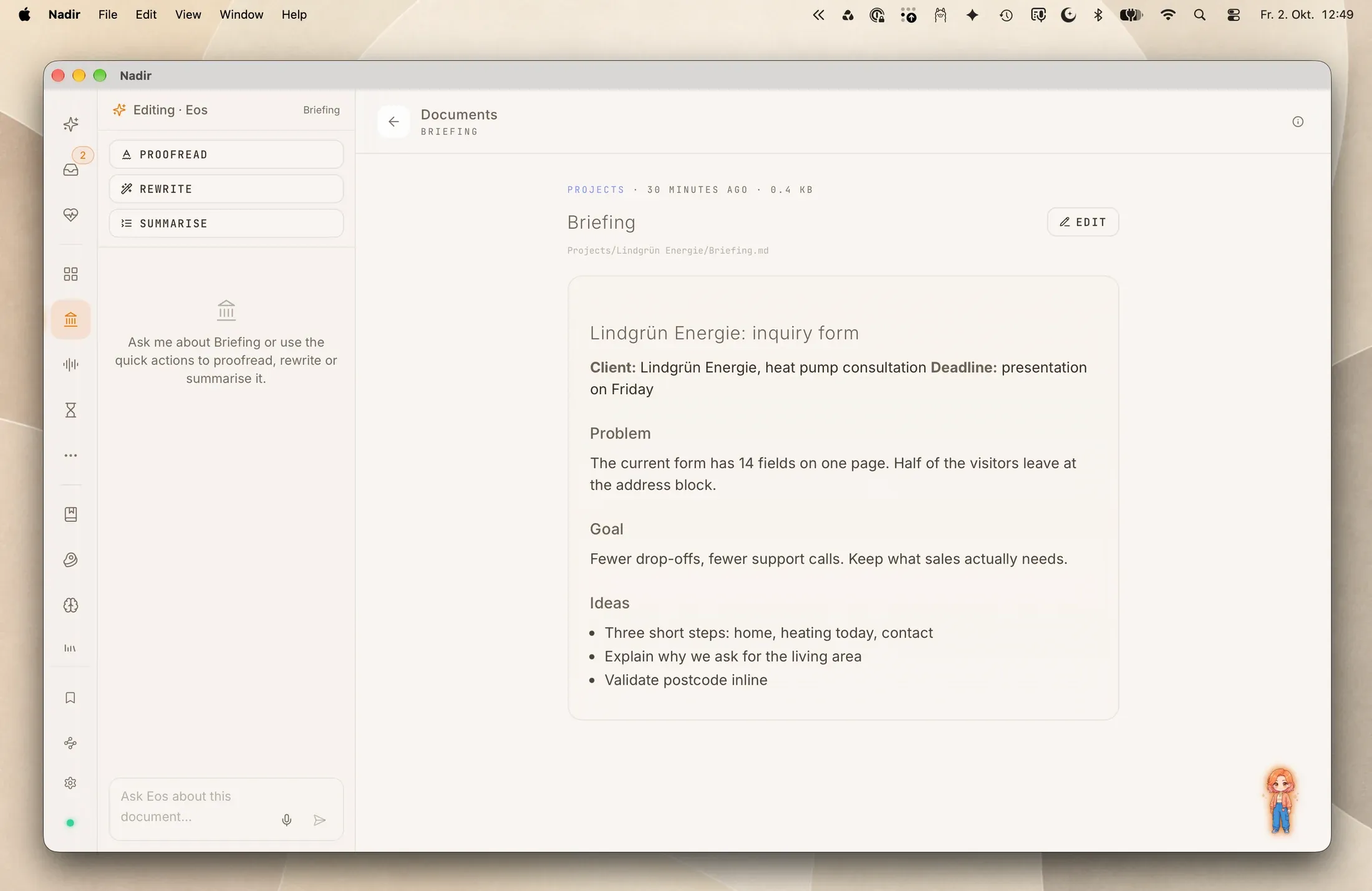
6 of 9 Research · DocumentsThe client briefing is a file in your folder. Eos proofreads, rewrites or summarises it when you ask.
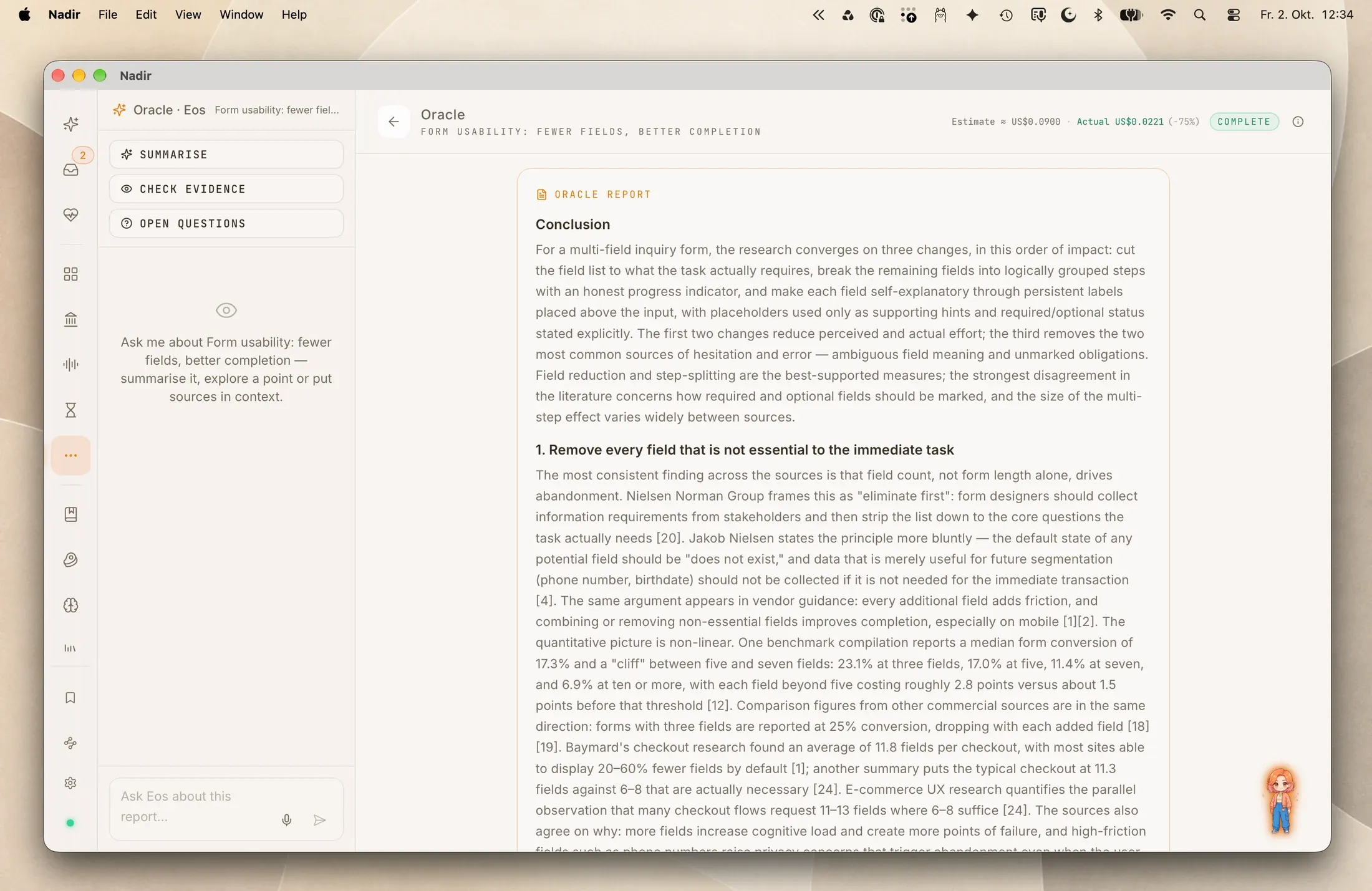
7 of 9 Research · OracleOracle researches with sources and writes a report. Estimated and actual cost sit right next to it.
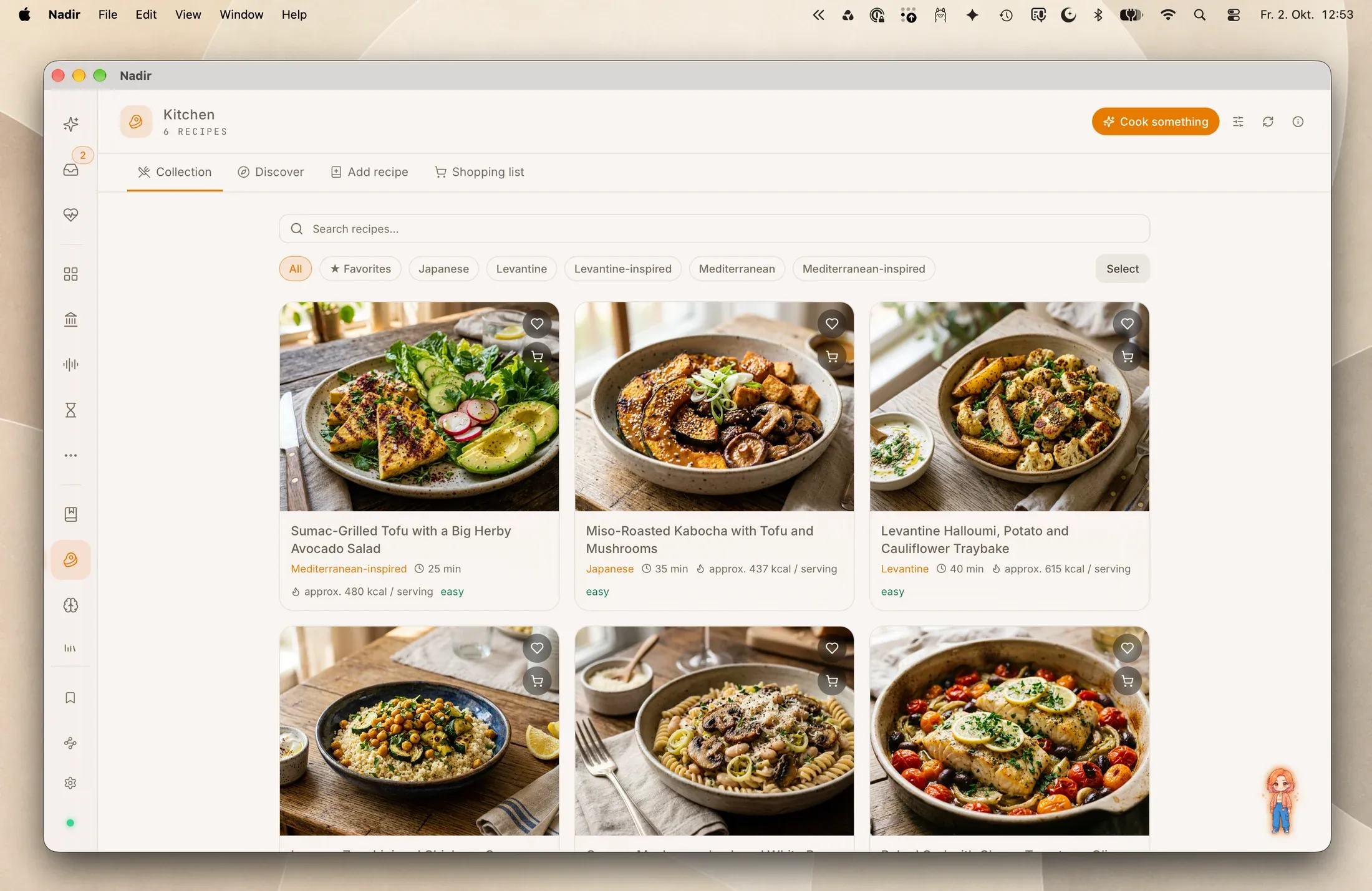
8 of 9 After work · KitchenAfter work. Recipes from your own collection or a new one on request, shopping list included.
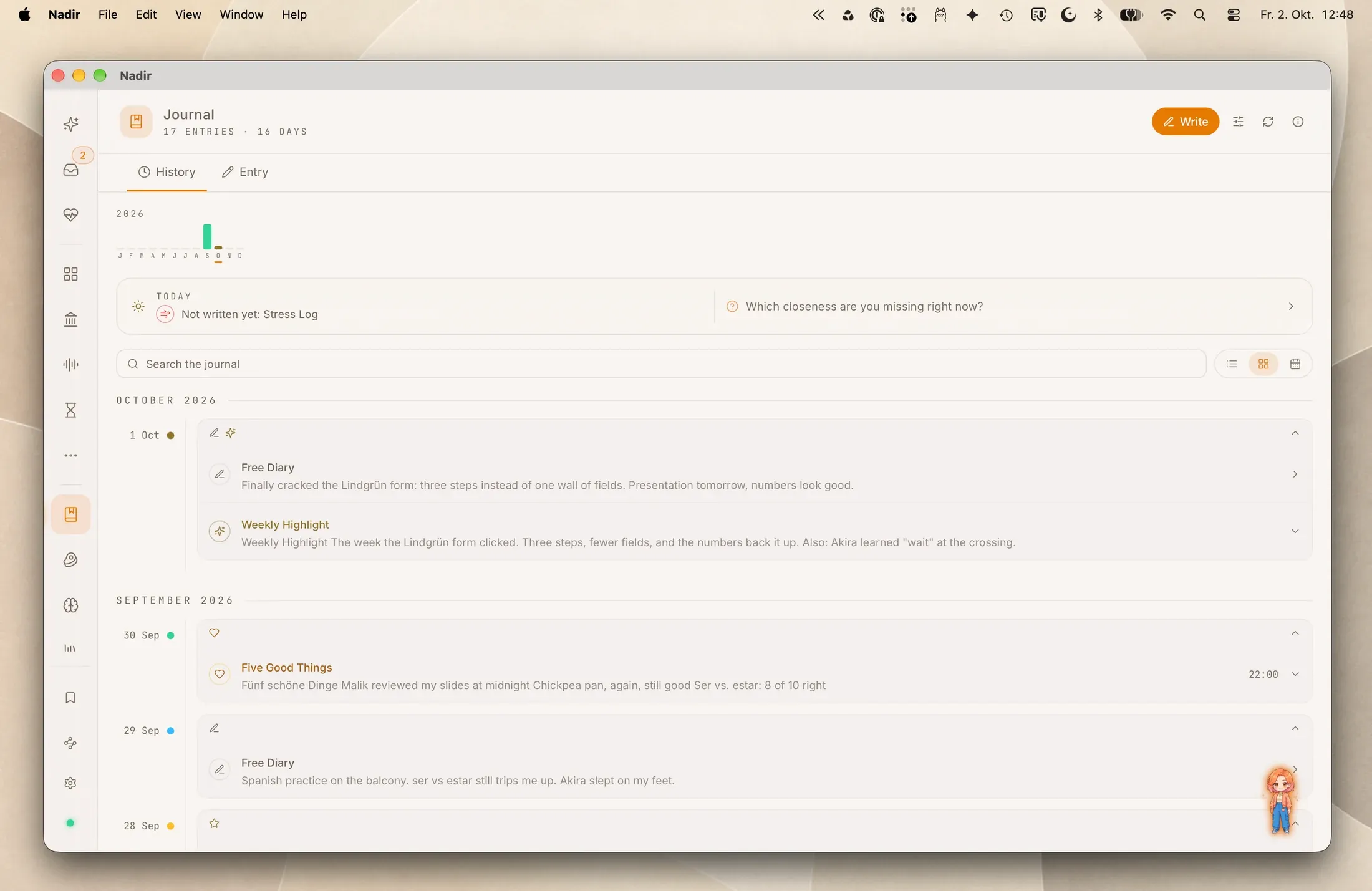
9 of 9 Evening · JournalIn the evening, a few lines in the journal. If you like, Eos sums up the week.
Ready in a few minutes.
Download and open
Download Nadir for your Mac and open it.
Choose a folder and a model
You decide where your companion works: locally on this Mac or with a model in the cloud. Pick the built-in Gemma model, OpenRouter, Apple Intelligence* or Ollama. Nadir downloads Gemma once during setup (7.3 GB), and your Mac needs 24 GB of memory for it.
Meet your companion
Choose who keeps you company, and get started.
No terminal. No config file. No server. No account.
* Apple Intelligence runs entirely on your Mac, but it is the smallest model. It handles short conversations and simple tasks. Oracle, Travel and Tribunal need a stronger model. You get one locally with the built-in Gemma model or with Ollama, or in the cloud through OpenRouter with your own key. Images currently come through OpenRouter, and web search needs a search key of your own. Support has the full breakdown.
If you use a cloud model, you pay its provider directly for what you use; buying a companion includes no credit for that. With Gemma, Apple Intelligence* or Ollama: zero euros.
Nadir is a one-person project by Studio Feike, built in the EU.
If you want to give something back, you can leave a tip on Ko-fi. It is voluntary and buys nothing extra; the app stays the same either way.
Yes. Only additional companions cost money, and only once. If you use a cloud model, its provider bills you directly.
What does beta mean?
Nadir works day to day, but not every corner is smooth yet. Back up regularly. Send whatever breaks from Settings → About Nadir → Send feedback, or straight to support@hellonadir.com.
Do I need an account or an API key?
No. With Gemma, Apple Intelligence* or Ollama you need neither. Cloud providers such as OpenRouter need your own key.
Where does my data live?
On your Mac. Notes and documents are files in a folder of your choice; conversations and memory live in the app's folder.
Does Nadir work offline?
With Gemma, Apple Intelligence* or Ollama, conversations and assistance run locally. Web search, images and cloud models need a connection.
Is Nadir a relationship app?
No. No flirting on demand, no exclusivity, no belittling of real relationships.
Who am I actually talking to?
An AI. Its “mind of its own” is designed behaviour, and “gets to know you” means more shared context, not consciousness and not retraining. In a crisis, your companion points you to real help.
Which Macs does Nadir run on?
On Macs with Apple Silicon running macOS 27 or later. Gemma, the built-in model, needs 24 GB of memory. With less, use Apple Intelligence*, Ollama with a smaller model or a cloud provider. The download page has the rest.
Is there an iPhone version?
It's in the works. There is no date yet.
Who is behind it, and why “Nadir”?
Studio Feike, a one-person studio in Spain. The name comes from the Arabic naẓīr: counterpart.
Beta: what's next
in progress
Working in feedback from the beta
iPhone and iPad
Pictures from your companion, if you allow them
planned
Your companion can also answer out loud, if you like
Answers as a clear view: a table, checklist or plan, in your companion's look
Your companion adds events and tasks itself once you approve them
Automatic backups on a schedule
Search your documents by meaning, with a list of matches